
Drive
The workspace’s private document store and knowledge base. It holds documents, meeting transcripts and workflow outputs in one place, and people can upload files directly or sync from an existing drive. This is the grounding layer: what the private AI reads so its answers come from the organisation’s own content rather than the open web.
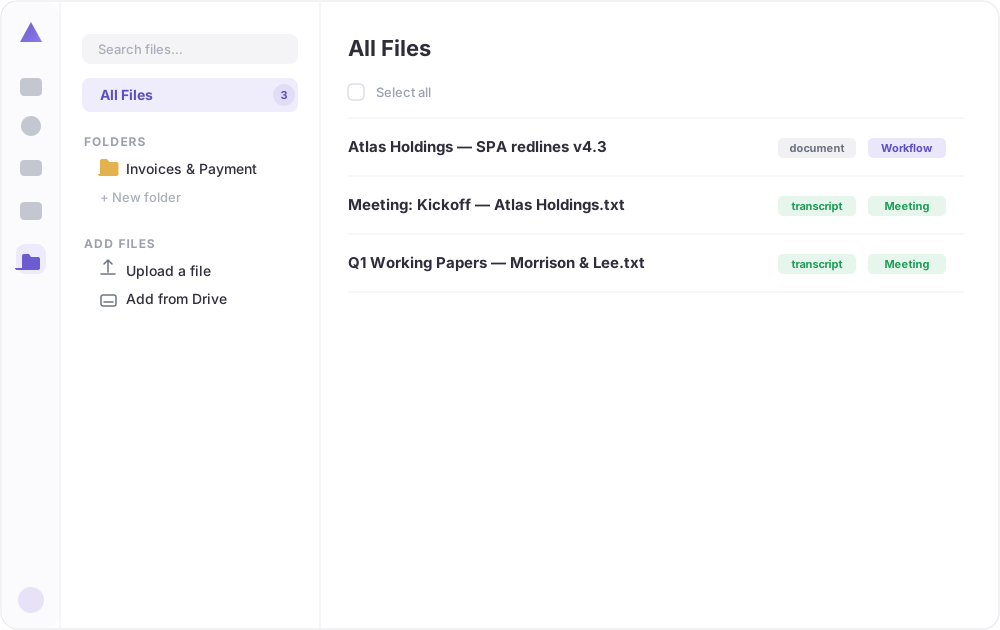 Every file in one place, tagged by type (document, transcript) and by source (meeting, workflow), with folders and the option to upload or sync from a drive (demo data).
What you can see
- All files in one place: documents, meeting transcripts and outputs produced by workflows.
- Tags: each file is labelled by type (document, transcript) and by where it came from (a meeting, a workflow), so the right material is easy to find.
- Folders: group files by client, project or topic.
- Add files: upload directly, or connect an existing drive to bring documents in.
Why it matters
- It is the source the AI draws on when it answers from the organisation’s own knowledge.
- Meeting notes and workflow results collect here automatically, so the knowledge base grows as people work.
- Because it is private, sensitive documents stay inside the environment and are never sent to an external model.
Good to know
Set Drive up first. It is the grounding layer that makes everything else, the inbox drafts, the chat answers, the workflows, more accurate and more specific to the organisation.